Route planning in field sales: How sales teams save time and better serve customers

Summary
Efficient route planning in the field means much more than the fastest route. Successful teams take a two-stage approach:
- Prioritize customers — Which customers are A, B or C customers? Who brings in revenue, and who is at risk of leaving?
- Optimize routes — only then does it make sense to calculate routes, stops and dates.
Excel or Google Maps can handle this on a small scale; larger teams need specialized software. Structured planning not only saves kilometers but also increases sales and customer satisfaction.
Why Is Route Planning in Field Sales So Critical?
Field sales reps face the same challenge every day: too many customers, too little time. Without a clear structure, reps waste hours on the road – and miss the most valuable conversations.
Efficient route planning solves exactly this problem. It creates order, reduces stress, and ensures that visits happen where they really drive revenue.
The benefits at a glance:
- Travel times and costs drop – fewer detours, less fuel.
- More customer visits per day – because less time is lost in the car.
- Fewer duplicate visits or gaps – clear oversight prevents wasted trips.
- Better sales management – managers see where time goes and where revenue comes from.
Route planning is not a “nice to have” – it’s a lever for productivity and stronger customer relationships.
How Has Route Planning Changed?
In the past, route planning followed rigid models: circle methods, highway-based planning, or simply a paper map. That helped avoid detours but overlooked the key problem: not all customers are equally important.
Even today, many reps still plan by gut feel:
- “Where haven’t I been in the longest time?”
- “Where the coffee tastes best.”
Charming – but inefficient.
Modern sales organizations work on two levels:
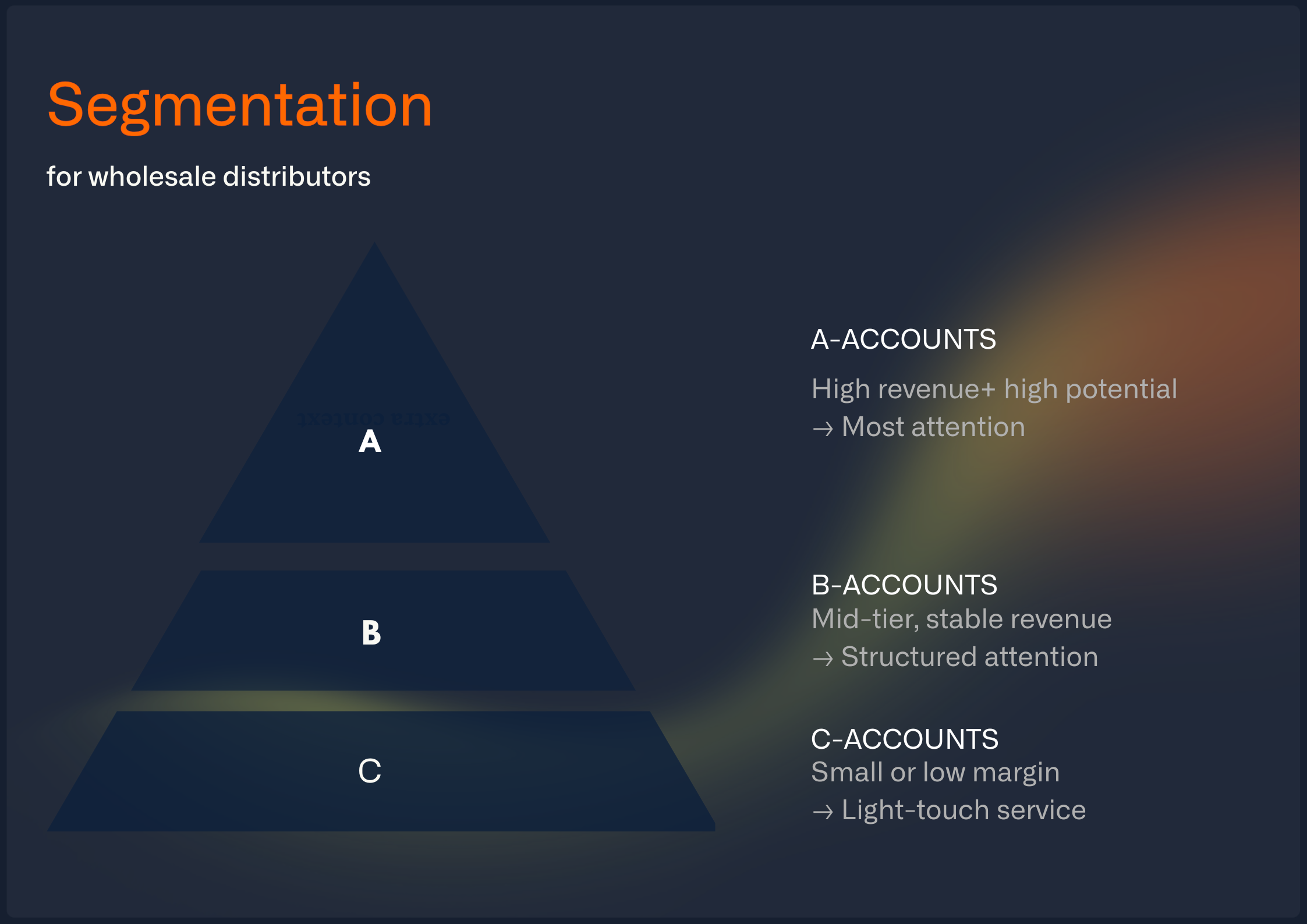
ABC segmentation
- A-customers: key accounts with high revenue share → regular, close attention.
- B-customers: solid potential → scheduled visits at longer intervals.
- C-customers: lower relevance → digital touchpoints or rare visits.
Classic segmentation as a foundation for route planning.
Data-driven prioritization
Segmentation alone isn’t enough. A C-customer can suddenly show huge potential – or an A-customer may be at risk of churn.
Modern systems detect such patterns automatically and suggest visits where the biggest impact is likely.
Why Route Optimization Alone Isn’t Enough
Classic ABC segmentation helps categorize customers: A-customers get close care, B-customers at intervals, C-customers less often. That brings structure.
But even the best segmentation doesn’t solve the core problem: if the wrong customers are on the route, even the “perfect” route is worthless.
In practice it often looks like this:
- Reps plan based on gut feel – “where they haven’t been in a while” or “where the coffee is good.”
- Customers are prioritized by proximity, not revenue potential.
- A-, B-, and C-customers get mixed up on the list.
The result: routes are efficient, but revenue stagnates.
The real question is: which customers should be on the route in the first place? Driving through a territory just because it hasn’t been visited in a while isn’t enough.
Instead of rigid segmentation, sales teams need dynamic prioritization. With Revenue Intelligence from ERP and CRM data, modern tools can automatically identify:
- Which customers show strong upsell potential.
- Where buying patterns signal churn risk.
- Which accounts deserve immediate attention – even if they were previously classified as “C-customers.”
If you only optimize kilometers, you are optimizing the wrong thing. Revenue growth starts with smart customer selection – only then does route planning make sense.

Route Planning in Field Sales in 5 Steps
Here is how most successful teams approach it – whether in Excel or with software:
- Prioritize customers: Who is an A-, B- or C-customer, and where is there potential or a churn risk right now?
- Set the visit rhythm: How often should each customer be visited – and who can you reach just as well by phone?
- Lock in the key appointments: The most important meetings of the week go into the calendar first.
- Build the route around them: Add nearby customers instead of driving across the whole territory.
- Follow up and adjust: Cancellations, new insights from the meeting and visit reports feed into the next plan.
Which Tools Help with Route Planning in Field Sales?
There is a wide range of software – from free online tools to specialized enterprise solutions. Here are the most common options:
portatour® – built for field sales, with CRM integration
One of the best-known solutions for sales route planning.

Strengths:
- Automatic daily and weekly planning based on customer data.
- Direct integration with CRM systems like Salesforce or Microsoft Dynamics.
- Takes visit frequencies, time windows, and customer priorities into account.
Best for: larger field sales teams with strong CRM usage – especially if customers need to be visited at fixed intervals.
Badger Maps – the international classic
Widely used in the US and increasingly in Europe, with a clear focus on field sales.

Strengths:
- Visualizes customer locations directly on a map.
- Optimizes daily routes, saving up to 25% driving time according to the vendor.
- Mobile app for iOS and Android, very user-friendly.
Best for: sales and service teams covering large territories.
Google Maps – the free entry-level option
Not a dedicated route planning tool, but many reps use it.
Strengths:
- Free and universally available.
- Great for small teams or individual reps.
- Simple multi-stop routing.
Limitations:
- Maximum of 10 stops per route.
- No prioritization or CRM integration.
Best for: freelancers or small teams without complex requirements.
For a broader comparison across prioritization, route planning, meeting prep and follow-up, see our overview of the best field sales apps 2026.
Other tools worth a look
- RouteXL – online route planner, free up to 20 addresses. Useful for deliveries or service routes.
- MapTrip – strong in logistics, with APIs for field service.
- Industry-specific apps – e.g. for technicians or tradespeople, with built-in scheduling.
Acto – the right customers first, then the route
Acto is not a traditional route planner. It works one step earlier: it first shows which customers have the greatest potential right now, then suggests suitable customers nearby. That way you build your route around the most important meetings; Google Maps handles the navigation.
Our Revenue Intelligence uncovers opportunities hidden in ERP and CRM data – and highlights the customers (and products) with the greatest revenue potential. Right in Outlook, your CRM, or on mobile.

Result: revenue growth for wholesale and manufacturing teams, for example +11.2 percent at Schäfer Shop.

Route Planning in Excel – Does It Work?
Many sales teams start with Excel spreadsheets: listing customer addresses, adding visit dates, and copying data into Google Maps. For small setups, that works – but:
- Beyond 20 customers per week, it gets chaotic.
- Changes (cancellations, new customers) are hard to work in on the fly.
- Travel times and mileage must be calculated manually.
Excel is fine to start with – but it quickly becomes inefficient.

Conclusion
Route planning in field sales means fewer kilometers – and more revenue.
The key isn’t just software, but the right order of steps:
- Identify the right customers first.
- Then optimize routes.
With clear structures, the right tools, and data-driven prioritization instead of gut feel, route planning becomes a competitive advantage rather than a time sink.
With Acto’s field sales AI, your team always visits the most valuable customers – and sells smarter.
FAQ: Route Planning in Field Sales
What free tools are available?
Google Maps or RouteXL are a good place to start. For larger teams, tools like portatour or Badger Maps are better.
What about data privacy?
GPS tracking of employees must comply with GDPR. Transparency, clear agreements, and strict purpose limitation are key.
Can you plan routes in Excel?
Yes, as a starter solution – but it doesn’t scale well.
Where is route planning heading?
AI will play a bigger role – detecting upsell opportunities and churn risks, then suggesting routes accordingly.
What methods are there?
- Classic methods: circle method, highway method, segment/slice method.
- Digital tools: Google Maps or Excel for manual basics, specialized tools for dynamic optimization.
- CRM/ERP integration: ensures customer data feeds directly into planning.