Voice Visit Reports: Talk It In Instead of Typing All Evening
Summary
- You talk in a visit report right after the meeting, in the parking lot or in the car, while the details are still fresh.
- What happens next matters more than the recording. The report has to land in the CRM without anyone typing it in a second time, and it has to create the follow-up tasks along the way.
- Dictating your own summary is legally a different thing from recording the customer conversation. To record the conversation, you need consent from everyone involved.
- Which route fits: a voice memo to try it out, the CRM app’s dictation for teams with a well-kept CRM, a voice-to-CRM assistant for teams with lots of customers where field and inside sales share tasks.
Last updated: November 2026
Which route fits whom, at a glance:
| Route | Best fit for |
|---|---|
| Voice memo app or dictation device | Individual reps who want to try talking reports in first |
| Dictation in the CRM app | Teams that already keep their reports in the CRM today |
| General-purpose dictation AI (e.g. Wispr Flow) | Heavy writers who want to dictate in every app |
| Voice-to-CRM assistant | Teams with lots of customers where field and inside sales share tasks |
Two minutes in the parking lot beats an hour at the kitchen table.
If you want to record visit reports by voice, you need three things:
- a fixed moment right after the customer
- a short script for what to say
- a system that turns the voice note into text, a summary and tasks and writes them to the CRM
Without the system, somebody still ends up copying the text over by hand at night.
That evening work costs selling time. According to Salesforce’s State of Sales report, sales reps in Germany spend only 27 percent of their working time in direct contact with customers. The 2024 survey covered 5,500 sales reps in 27 countries, 300 of them in Germany.
What do you need, and when is this not for you?
For voice visit reports, you need a smartphone, a fixed place where the report ends up, and a structure everyone on the team knows. On top of that, you need a privacy rule your team actually backs (step 2).
- A smartphone, plus earbuds or the hands-free system in the car
- A destination: the CRM or, without a CRM, a shared place inside sales can see, too
- A minimum structure, for example from our sales visit report template for field sales
Talking your reports in isn’t for you if:
- Your reports are almost all required fields like quantities and prices. Voice gives you text first.
- Reports at your company are mostly about control. Then your team will work around the voice note, too.
- Your team has so few meetings that writing at night isn’t a bottleneck.
Whether reps buy in comes down to what they get out of it. Field reps are practical: the dislike of CRM data entry grows with effort that doesn’t pay anything back.
Step 1: Which system do you use to talk in visit reports?
You talk in visit reports with one of four options: a voice memo app, the dictation in your CRM app, a general-purpose dictation AI or a voice-to-CRM assistant. The choice comes down to two questions: Where does the note end up, and who turns it into tasks?
| Route | Speed after the meeting | Path into the CRM | Follow-up tasks | Privacy to sort out |
|---|---|---|---|---|
| Voice memo app or dictation device | right away | type it up or copy it over at night | by hand | personal devices and storage |
| Dictation in the CRM app | right away, if the app is open | straight into the record | depends on the system | within your existing CRM setup |
| General-purpose dictation AI | right away | text has to be pasted in | by hand | one more vendor |
| Voice-to-CRM assistant | right away, with some tools also by phone call | automatic, if connected | automatic, with due dates | check the vendor and where data is stored |
Voice memo app and dictation device
A voice memo is there instantly and costs nothing extra. But the text still has to go into the CRM at night, so the evening work just moves. On top of that, you get shadow IT: audio files with customer names sitting on personal devices and in personal clouds.
Dictation in the CRM (Salesforce, Microsoft Dynamics and others)
If your CRM app supports keyboard dictation, you can use the dictation key on your phone’s keyboard to talk text into the notes field. Whether your version also summarizes or creates tasks depends on the system and the license. Test it with three real notes before you roll it out to the team.
General-purpose dictation AI (e.g. Wispr Flow)
Wispr Flow turns speech into readable text and smooths out filler words and self-corrections, in any app. The tool doesn’t know your customer data, your CRM or your task logic. In one of our conversations, a prospect described exactly what’s missing here: just tell it freely in a voice message, and the system matches people and points to the right fields.
Voice-to-CRM assistant
A voice-to-CRM assistant takes the voice note, summarizes it, creates follow-up tasks and writes the report into the customer record. It pays off when you have lots of customers and several people work the same account. It needs a connection to your systems and a proper rollout. You can read more about the category in our article on voice-to-CRM.
Step 2: Are you allowed to talk in visit reports?
You can talk in your own summary after the meeting as long as you follow the applicable privacy rules, because you’re only recording your own words. It’s a different story if you record the conversation with the customer itself.
Under German law, recording words spoken in private without authorization is punishable under Section 201 of the German Criminal Code (StGB) with up to three years in prison or a fine, even if you’re part of the conversation yourself. Recording is only allowed with the consent of everyone involved. The GDPR applies on top of that: recording a conversation touches criminal law and data protection at the same time, and the legal basis is usually consent.
Your own summary contains personal data, too, like the buyer’s name. So sort out with your data protection officer and works council where audio and text get stored, how long an audio file stays around and who has access. Ask every vendor whether voice input gets saved as a file or converted straight to text. That includes us.
Important: This section isn’t legal advice. Have your data protection officer sign off on your team rule before you start.
In the same rule, spell out what reports are used for. Sales leadership works with tasks and signals, not with the exact wording of every note. That keeps the tool from turning into a way to keep tabs on people.

Step 3: When do you talk the report in?
Talk the report in right after the meeting, in the parking lot or over the hands-free system as you pull out. As a rule of thumb, 30 to 90 seconds is enough, as long as you use the script from step 4.
According to our study “Wholesale Sales 2026”, field reps in wholesale make about six visits a day. That’s the median from 42 data points in our own sales conversations from 2024 to 2026. If you write those visits up at night, the first report is hours old, and “customer is annoyed about lead times on roof windows” turns into “discussed lead times.”
Or the report never gets written at all.
“A lot of the time a visit report just doesn’t get written, and I have to chase it, or what’s in it isn’t what I’d want.”
– Sales director, customer conversation (translated from German)
For 20 years, getting reps to actually enter data was one of the biggest obstacles in sales. Voice fixes that, because typing on a laptop turns into a short conversation in the car. The switch still isn’t easy: even the CEO of Wispr Flow calls getting office workers to move from typing to voice a “tough task”.
In field sales, the car is the office anyway. The first companies are already setting up for that:
“In our industry, there are already the first ones that actually have a voice agent in the car. So the field rep is on the road and just talks to their AI agent.”
– André Buck, Berner (Revenue Signals, episode with André Buck, translated from German)
Omnichannel, pricing and going from information broker to value architect (in German)
Every evening hour you save pays into one of the two levers in sales: more time with customers instead of in admin. You can read more in our post on AI in field sales.

Step 4: How do you write a visit report you can say out loud?
A spoken visit report follows a fixed script with five points, in this order:
- Customer and contact
- Topics
- Agreements
- Next steps
- The side notes
The side notes are the part that gets dropped first when you type. A made-up example shows the difference:
| Typed up at night | Talked in right after the meeting |
|---|---|
| “Weber Painting: discussed product range. Interest there.” | “Weber Painting, talked to the owner. He’s been buying rollers and brushes at the home improvement store because we couldn’t deliver twice. Wants a quote for paint by Friday. Closed for vacation from August 1, and after that his son takes over purchasing.” |
We like to explain why that matters with two worlds five years from now. In the first, a new rep takes over the territory of someone who looked after it for decades, with a modern CRM but without that person’s knowledge. In the second, a voice assistant tells the new rep that a customer has been ordering less for three weeks and that the owner hinted at handing over to his son during the last visit. The predecessor had talked it in, and the system kept it.
For required fields and structure, use the visit report template. The script is its spoken short version.

Step 5: How does a voice note turn into a CRM entry with tasks?
A voice note turns into a CRM entry when the software summarizes it, files it in the customer record and pulls out tasks with due dates. Tasks for other people, like a quote for inside sales, go straight to whoever owns them.
Without this step, the visit report stays an archive. In a lot of places, visit reports are seen as a time sink rather than a sales tool.
“The manager could look at the visit reports manually. There aren’t any tools that analyze anything. […] So that’s why I think, in practice, nobody looks at them.”
– Head of digitalization, auto parts wholesaler, customer conversation (translated from German)
When “wants a quote for paint by Friday” automatically becomes a task for inside sales due Friday, the report actually leads somewhere. Field sales sees that talking it in pays off. Inside sales doesn’t have to ask.
The most common trap here: the voice note gets copied into the CRM at night. Then the double entry is back, just with a different tool. How to automate workflows like this end to end is in our piece on field sales automation.

How a visit report works with Acto, from the parking lot to the next meeting
Acto is a sales AI for wholesale, and voice follow-up is one part of it. We’re the company behind Acto. Here’s a run, using a made-up roofing company as the example:
The meeting at Hoffmann Roofing is over. In the parking lot, your rep taps “Add note” and records a voice memo, or calls the AI and tells it how the meeting went: the customer last bought roof windows from a competitor because of lead times. He’s open to a Velux framework agreement.
Acto turns the speech straight into text and summarizes it. Out of that comes the task “Send Velux framework quote with guaranteed delivery by end of month,” with a due date and, if you want, assigned to inside sales. If your CRM is connected, the report goes there. Larger companies use Acto as a sidebar in their CRM, for example in Salesforce, or in Microsoft Dynamics 365, and in Outlook on top. Smaller ones use Acto as a lean setup instead of a CRM.
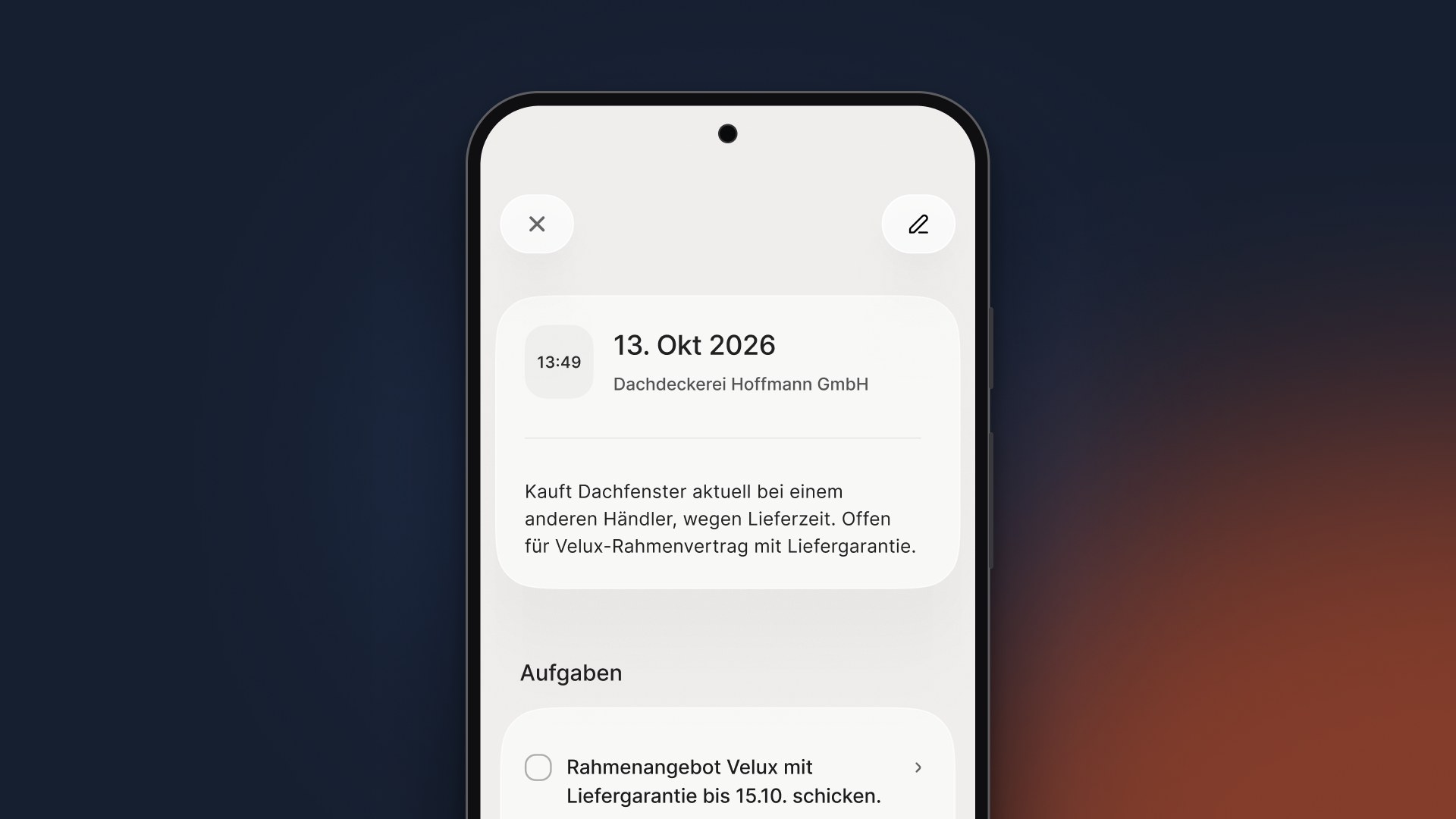
A talked-in visit report for Hoffmann Roofing, with a note about the competitor and the resulting task for the Velux framework quote (app shown in German).
At the next meeting, the note comes back up. Acto pulls the key points from earlier reports and connects them with the order data from the ERP. So the system takes the note about the delivery problem into account when it prepares the next meeting. Acto only writes back to the CRM, never to the ERP. We show the new features in an overview of voice AI, meeting prep and follow-up (in German).
Plate saves 1 to 1.5 hours a day with Acto, Schäfer Shop up to 8 hours a week per employee. Both numbers refer to working with Acto overall, not just to visit reports. Whether structured CRM fields like quantities get filled in automatically is something we sort out for your system before you start. Getting up and running usually takes 4 to 6 weeks, depending on your system landscape, data quality and number of locations, with 2 to 3 days of IT work.
Your first step this week doesn’t need anything new: ask your team how long they spent on reports at night last week. Then have two or three field reps talk in their next visits right in the car, using their phone’s dictation and the script from step 4. On Friday, compare the time spent and what’s in the reports.
On a call, we’ll show you live how a voice note from your field team turns into a report, tasks and a CRM entry.
FAQ
Is talking reports in worth it for a small team without a CRM?
Talking reports in pays off without a CRM, too, as long as the report lands somewhere inside sales and whoever covers for you can see it. To start, a shared folder where the voice memo transcripts go is enough. Once tasks start getting lost or reports get entered twice, you need a system that connects the note and the task.
Can you fill in a project-based visit report by voice?
You can talk in project-based reports if you name the project at the start of the note. One prospect told us about customers with 15 to 16 projects running, where every project gets its own report. Before you start, sort out which field or record in your CRM the software writes each project’s report to.
What do you do when your best rep won’t talk into their phone?
An experienced rep starts talking reports in as soon as they see what comes back: tasks that get done and meeting prep that includes their own notes. Ride along for a day and talk in the first reports together in the car. What matters most for the rollout is that the report is in the system the same day.